AndaSeat Xtreme Series Ergonomic Standing Desk

design
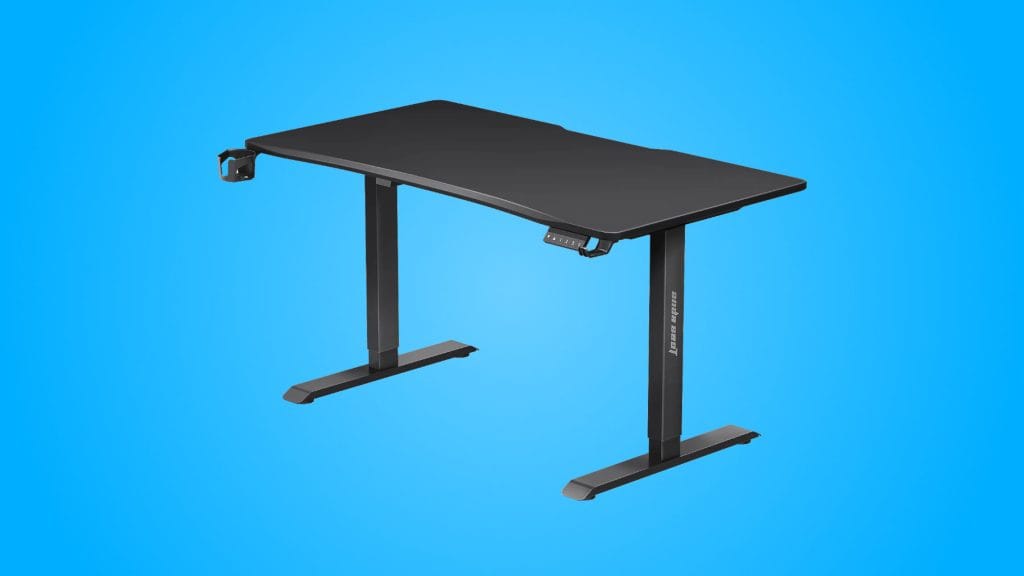
There are a couple of basic choices to make when you order an Xtreme Series desk. Size (1.2m or 1.4) and colour (black or white). In fact, if you opt for the smaller of the two you don’t even get a choice of colour, it’ll be black. I tested the white 1.4m version of the AndaSeat Xtreme Series and my first impression was one of pleasant simplicity. Much like the packaging it arrives in, it’s not going to win any design awards but equally I’m not disappointed by anything either. The slightly textured surface feels nice under the hand, the bevelled edges soften things off, and there’s a small scoop taken out of the front edge that I didn’t mind at all.

Assembly was straightforward enough. Working solo I had everything put together in around half an hour, which compares favourably to the 90 minutes the EZ Desk Carbon Edition demanded of me, despite their similarities. There were no missing parts, no head-scratching moments, just a sensible flatpack experience.
One thing worth noting is AndaSeat has opted for a single-motor design on the Xtreme Series. Unlike dual-motor desks such as the Autonomous SmartDesk 2, the Xtreme Series desk runs its motor on just one side. This means there’s an exposed driveshaft rod running underneath the desk, and while it is protected a little with bars on both sides, I banged my knee on it a few times. It’s a budget consideration rather than a flaw, and it’s not unique to the AndaSeat, but something to be aware of.

While going single motor is an obvious area of cost-saving, the in-leg power is a surprisingly nice touch at this price point. Rather than cables dangling down externally, the main power connection sits at the base of the left leg, with a power outlet at the top for general use. There’s also a handy USB-C charging point hidden on the side of the controller that runs off this too. It’s a tidy solution and genuinely useful.
Where things get a bit disappointing is the cable management tray. It exists, which is good, but its execution is frustrating and it’s incredibly basic. It’s a basic fixed metal tray that you just dump everything into and the ends are closed off, making it tricky to actually thread cables through. Good luck ending up with any neat cable management in there, there’s no hinge or release mechanism either, so you’re left stuffing cables in and hoping for the best. A simple hinge to drop the tray down would have made a world of difference. On the plus side, there’s a thoughtful cutout in the back of the desktop for monitor arms and cable pass-through, and AndaSeat includes a couple of stick on cable holders.
performance
I’ve used the AndaSeat Xtreme Series as my daily driver for a couple of weeks now, so I’m pretty well up to speed with everything it has to offer. Stability was the pleasant surprise for me. With a 34″ ultra wide monitor and a laptop mounted on a rigid arm, the AndaSeat Xtreme Series stayed solid at all heights and while moving. Even at full standing height there was none of the noticeable wobble that plagued my time with the EZ Desk Carbon Edition. For a desk at this price, that’s impressive.

The AndaSeat Xtreme Series is slower to move up and down than some competitors, but honestly, how rapidly do you need it to move? It’s quick enough to not be a problem and the movement itself is smooth with a nicely rounded acceleration and deceleration. No jolting, no juddering. A little louder than the Secretlab MAGNUS Pro during adjustment, but again, fine enough and not enough to raise eyebrows in a shared space.
The control panel is definitely functional rather than fancy. It’s actually an identical unit I’ve seen on desks from other brands, so I get the sense this is a stock supplier component. The LED display is perfectly readable and the three memory presets work as expected. There’s a slight delay between holding the button and the desk responding, which makes tiny adjustments a little fiddly, but nothing deal-breaking. The sedentary reminder and child lock features work fine if you need them though the child lock is not the most intuitive thing to enable. I much prefer the basic physical switch approach of the MAGNUS Pro as it also offered a visual clue, but holding a button for a few seconds is fine too.

There is a problem when it comes to movement though. The AndaSeat Xtreme Series is advertised with an anti-collision system that stops the desk if it detects an obstruction. In my testing, it simply didn’t work at all. I tried pulling my chair arms underneath the desk while lowering it, expecting it to stop when it noticed the resistance. Instead, it happily tried to crush them and didn’t even stop when the desk itself started tilting. In fairness, the lowest height setting is still higher than the top of my knees were, so it won’t come anywhere near your legs if you’re sat in an AndaSeat chair like the Kaiser 4. But still, not great.
The included accessories, a retractable headphone holder and cup holder, are nice to see but are also basic plastic affairs that screw onto the bottom of the desk. I personally never love bolt-on accessories like this because the idea of my drink hanging precariously off the edge of my desk doesn’t fill me with joy. But they’re there if you want them and you don’t need to buy them separately like you do with the likes of Secretlab, I didn’t bother installing either though.
summed up
The AndaSeat Xtreme Series is a sensible first crack at a standing desk from a brand that knows chairs pretty well at this point. It ticks the most important boxes and that’s the main thing. It’s stable at all heights, smooth when travelling between them, reasonably priced, and the in-leg power routing is a lovely touch at this end of the market.
But it’s not without compromises. The single-motor design means an exposed driveshaft, the cable tray is frustrating to work with, and the anti-collision feature that’s prominently advertised? It didn’t work at all in my testing.
If you’re already invested in the AndaSeat ecosystem and want a desk from the same brand, the Xtreme Series will serve you pretty well. If you’re shopping purely on value it’s not a bad choice either. In fact, it’s a pretty easy desk to recommend if you’re upgrading from a static option, just know the price point does limit things and there are better options available.