
Logitech Signature Slim Solar+ Wireless Keyboard K980

design
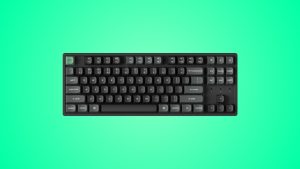
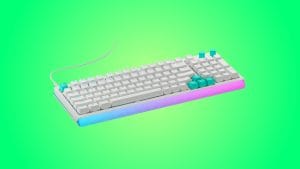
At first glance, the Logitech Signature Slim Solar+ K980 could pass for an MX Keys S. The same rounded corners and low-profile silhouette are present, wrapped in that familiar Logitech graphite finish. That’s a good thing, the MX Keys S is a stylishly simple keyboard that I rated highly. Place it side by side with the K980 though, and the differences start to reveal themselves.
The biggest change is an obvious one, the addition of a solar charging strip running across the top edge above the function keys. It’s actually quite elegantly done, with a slatted design that catches both the light and your eye rather nicely. Logitech does warn you not to rest pens or cables on it, which feels like they’ve anticipated exactly what most of us would do with what looks like a convenient little shelf. Fair enough.

Where the MX Keys S feels like a dense, premium slab that weighs the best part of a kilo, the Signature Slim Solar+ K980 is noticeably lighter at 700g and a little less refined too. That new scale reading is good news if you’re slipping it into a backpack, less so if you valued that planted, robust feel of the alternative. The recycled plastic construction is part of the weight saving here, with 70% post-consumer recycled material in the graphite model. It’s a commendable approach that Logi is taking more often, though you can feel the difference. I’m not saying recycled plastic can’t feel premium, it’s just that it doesn’t give off those vibes on this occasion.
The full-size layout includes a number pad and dedicated function row, though Logitech has swapped traditional F-key actions for their own shortcuts. You’ll find media controls, brightness adjustment, and a dedicated AI Launch key that opens Copilot on Windows out of the box. Mercifully as someone who’s never willingly opened Copilot, let alone needed a physical shortcut for it, all of these can be remapped through the Logi Options+ app, so you’re not locked into Logitech’s choices.

One thing that hasn’t changed from the MX Keys S is the fixed typing angle. The Logitech K980 sits flat to the desk with no flip-out feet to adjust the incline. I’d have liked some flexibility here, but the low-profile design means I still found it comfortable enough without a wrist rest for most typing sessions.
performance
Here’s where my fondness for laptop-style keyboards comes in really handy for Logitech. The Signature Slim Solar+ K980 uses scissor switches that feel immediately familiar if you’ve spent time with any of Logitech’s recent low-profile boards. The chiclet keys are quiet, responsive, and have that satisfying soft resistance that makes long typing sessions comfortable rather than fatiguing.

But while I didn’t dislike typing on the K980, it was pleasant enough, something just felt a bit off. I couldn’t work it out at first because coming from the MX Keys S that I loved, I’d expected things to remain the same. It was only when I sat the two side by side that I noticed the major difference. The keycaps on Logitech’s pricier keyboard have subtle concave indents that guide your fingers into position. The Slim Solar+ K980 has flat keycaps instead, you’re typing in manual mode. It’s not a dealbreaker by any means, but touch typists will notice the difference in precision I’m sure, particularly during longer writing sessions.
Now, the headline feature. The Logi LightCharge system harvests energy from not just direct sunlight like a traditional solar panel, but any light source. It doesn’t matter if it’s natural or artificial, it just needs a minimum of 200 lux to charge. That’s roughly equivalent to standard office lighting, so unless you’re working in a particularly gloomy basement, the keyboard should stay topped up indefinitely. Logitech claims four months of use in complete darkness on a full charge, with a battery lifespan projected at ten years.

In testing, the light-based charging worked exactly as advertised…ish. The Options+ app includes a handy light meter that shows whether your current environment is bright enough for charging, and my home office setup kept the battery topped up. I did notice a few times on a cloudy day where it reported not having enough light, despite the room feeling reasonably lit. This was the minority though and with four months of charge to play with it’s unlikely to be a problem.
The Logitech K980 connects via Bluetooth Low Energy and supports Easy-Switch between up to three devices. As with the MX Keys S, switching is instantaneous and rock solid. I paired my Windows laptop, iPad, and Android phone without any drama, and the keyboard was ready the moment I tapped the corresponding device key. This is Logitech doing what Logitech does best.

What the K980 doesn’t have is backlighting. At all. Not even a caps lock indicator LED. This is the price of solar efficiency, and I’m not sure it’s a fee I’m happy paying. It’s a significant limitation for evening work or even simply dimmer spaces, there’s a reason it’s become standard practice on keyboards since I can remember. It’s useful.
The other notable omission is a USB-C port. There’s no wired fallback, no emergency charge option, no cabled typing if your device’s Bluetooth is bust. If the battery somehow dies completely, you’re waiting for light to trickle your keyboard back to life. It’s a bold design choice that feels almost Apple-esque in the quest for portless devices, but it also speaks to Logitech’s confidence in the solar system, space shuttles always have backup options for a reason though.
summed up
The Logitech Signature Slim Solar+ K980 is a fascinating proposition and in some ways, a glimpse into the future. The light-based charging works well, the typing experience is tidy and quiet, and the multi-device connectivity is as seamless as we’ve come to expect from Logitech. At £99.99, it’s £10 cheaper than the MX Keys S but it’s hard to ignore what’s been sacrificed along the way. The flat keycaps don’t gently guide your fingers like the concave indents on the MX Keys S. The absence of backlighting limits usability in low light and glance checks of caps lock. And that missing USB-C port means there’s no safety net if something goes wrong.
For office workers in well-lit environments who value a clean, cable-free desk above all else, the Logitech Signature Slim Solar+ K980 makes a compelling case. If you prioritise typing feel, need backlighting, or want the reassurance of a wired backup, the MX Keys S remains the better choice despite costing a little more. The K980’s solar trick is impressive, but it’s not quite enough to eclipse its neighbours.