
UGREEN DXP4800 Plus NAS
design
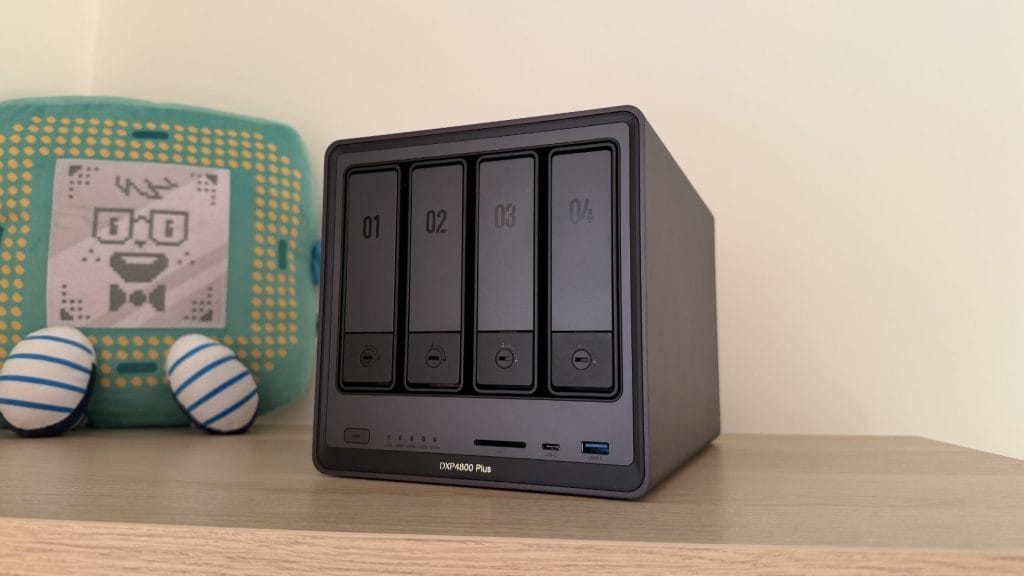
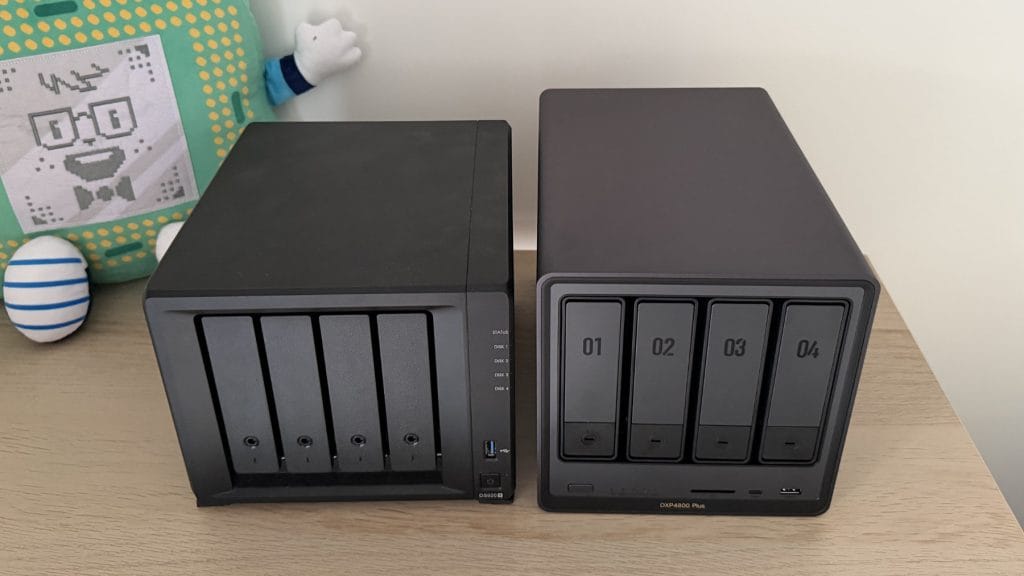
The UGREEN DXP4800 Plus makes a wonderful first impression. The aluminium alloy chassis has a matte grey finish that sits somewhere between industrial and premium, and the build quality is immediately apparent when you pick it up. This is a marked departure from the plasticky housings that have become standard issue in the NAS world, and it makes products from established brands like Synology feel rather dated and cheap by comparison. UGREEN has clearly invested in industrial design here, and the result is a unit that looks at home in a modern workspace rather than something you’d want to hide in a cupboard. Though it was the under stair cupboard where I still kept mine.
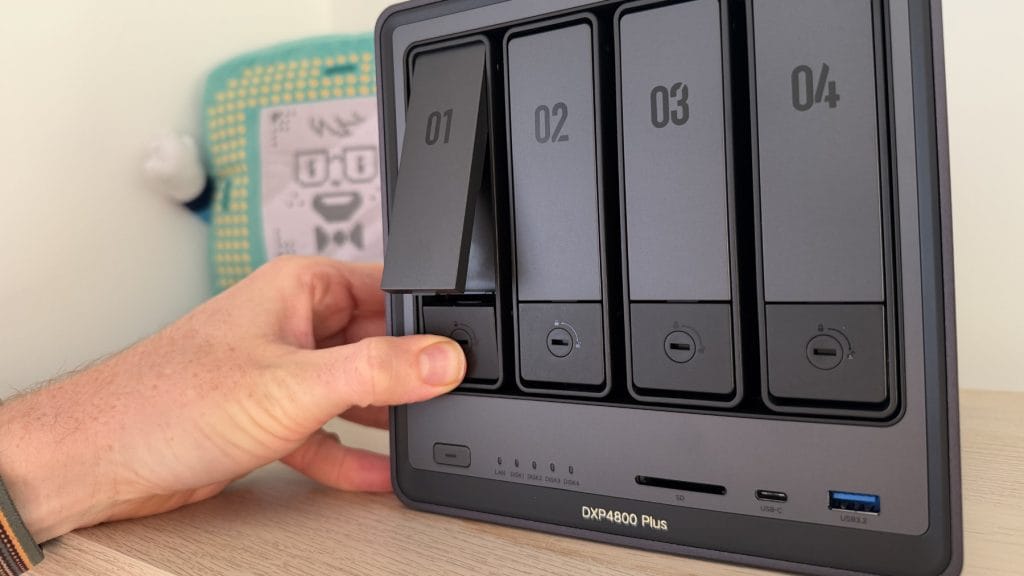
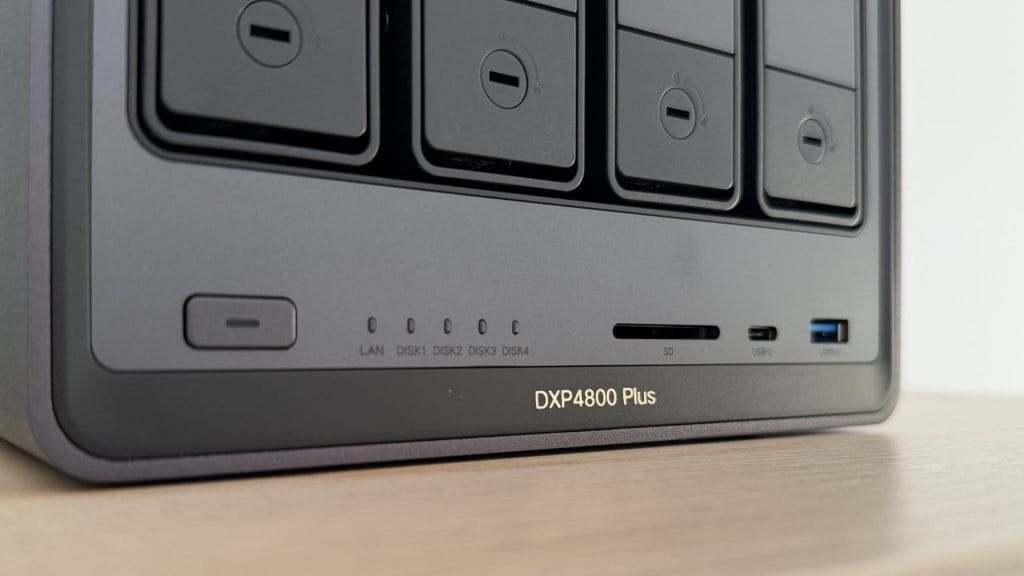
The front panel houses four numbered drive bays with tool-free caddies, a power button, activity LEDs for network and drives, plus a USB-C port, USB-A port, and an SD card reader. That front-mounted connectivity is a thoughtful touch, being able to quickly dump photos from an SD card or transfer a day’s shooting from an external drive without fiddling saves plenty of hassle. The drive trays themselves are plastic, which feels slightly at odds with the premium metal chassis, but they’re well designed and don’t look out of place. A sliding bracket system secures 3.5-inch drives without any screws whatsoever, and the click-into-place mechanism is more satisfying than it has any business being.
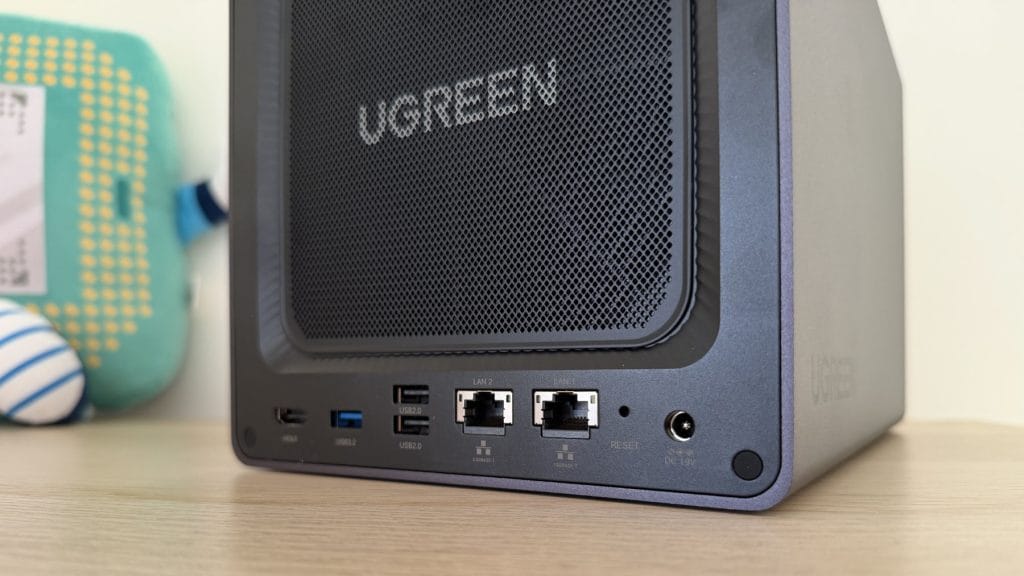
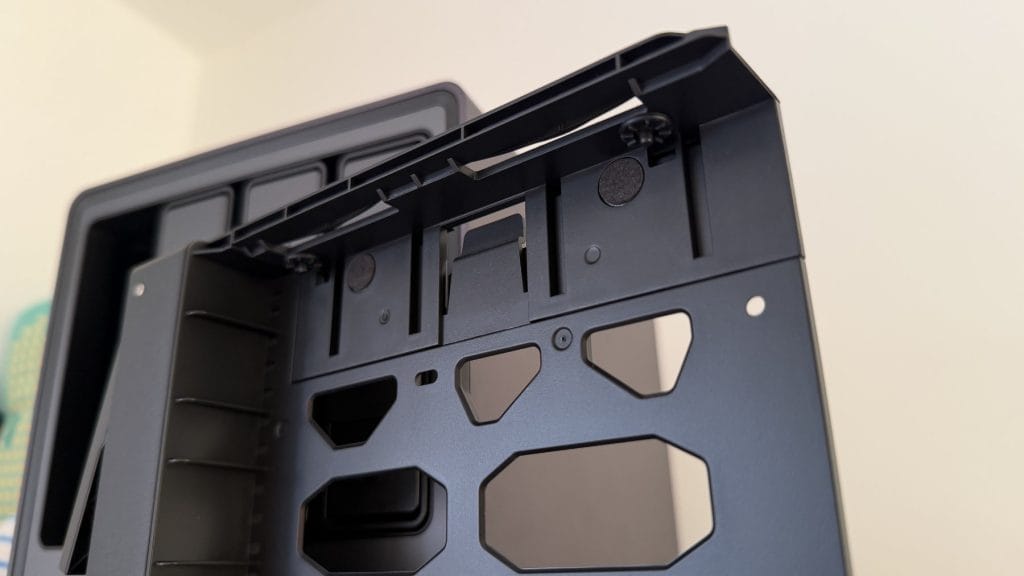
Around the back, the UGREEN DXP4800 Plus offers 10GbE and 2.5GbE LAN ports, HDMI 2.0 output capable of 4K at 60Hz, USB 3.2 Gen 1 and dual USB 2.0 ports, plus the DC power input. The 140mm cooling fan is protected by a sleek magnetic dust filter that lifts off for easy cleaning. UGREEN includes two Cat 7 network cables in the box, along with a screwdriver and thermal pads for the M.2 slots.
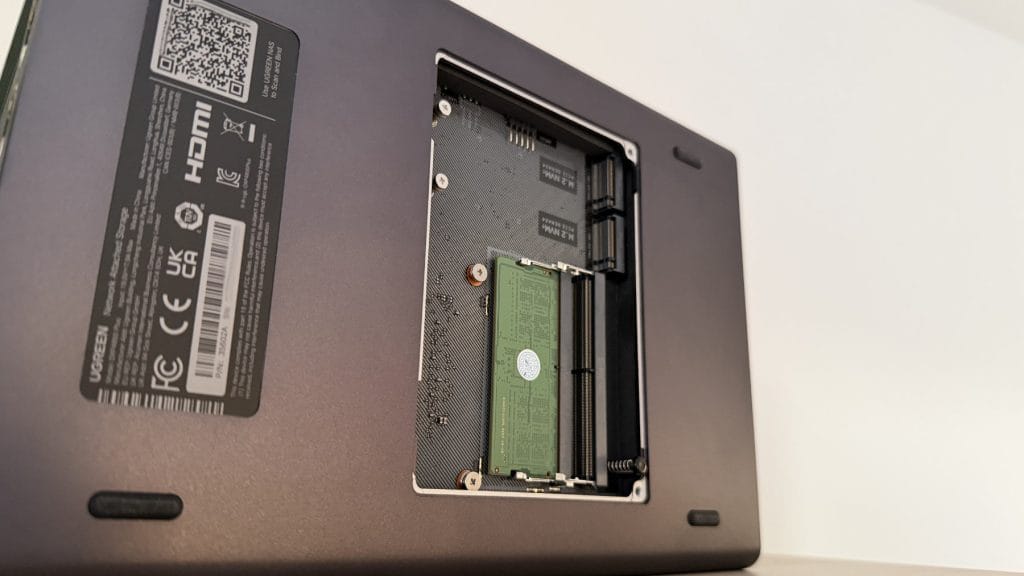
A pair of M.2 NVMe slots are accessed via a plate on the underside of the unit, alongside the user-upgradeable DDR5 RAM (8GB stock, expandable to 64GB). The provided silicone thermal pads are impressively thick and do a proper job of heat dissipation. For this review, I installed an additional M.2 drive to serve as a dedicated storage pool for Docker configurations and unpacking tasks, and temperatures remained comfortable throughout testing, even under load.
performance
I tested the UGREEN DXP4800 Plus with Seagate IronWolf drives for data, with that additional M.2 SSD handling Docker workloads and stuck with the basic 8GB of pre-installed RAM. I wanted to see how the unit performed without throwing additional hardware at it. Setup was refreshingly straightforward. Navigating to UGREEN’s scanner link immediately detected the device on my network, and the initialisation process walked through storage pool creation, RAID configuration, and user account setup without any fuss.
The UGOS Pro operating system is certainly tailored to a more beginner audience than the DXP4800 Plus’ specs are. The interface is responsive and logically organised, largely mirroring what you’d expect to see on a desktop PC. The basics like file management, user administration, and storage monitoring are all handled competently through a clean web UI. Comparing directly to the UGREEN DH4300 Plus I reviewed previously, the DXP4800 Plus is noticeably snappier in everyday navigation, which isn’t surprising given the significantly more capable Pentium Gold processor. Where the DH4300 Plus occasionally ground to a halt during large file transfers or archive extraction, the 4800 Plus barely broke a sweat handling the same tasks.
For my testing, I ran a full media server stack with the arr suite (Sonarr, Radarr, Prowlarr, and friends) alongside a Plex server, with media stored on both the internal SATA array and an external USB 3.0 drive. In my mind this is exactly the sort of workload the DXP4800 Plus is designed for, and it handled everything without complaint. UI navigation within Plex and the various management interfaces was responsive and snappy, library scanning completed promptly, and the system never exhibited the sluggishness that less capable NAS units often suffer when juggling multiple Docker containers.
As impressive as the DH4300 Plus is, the step up to the DXP4800 Plus is noticeable in almost every action. Even while unpacking a huge file, the NVMe-mounted containers remained fully responsive, the SATA-only DH4300 Plus just couldn’t handle that kind of strain all at once.
It’s worth noting that while Jellyfin is available as a native UGOS application, Plex users will need to install via Docker, which UGREEN does support natively through the App Center. This is actually how UGOS handles most of its own native applications anyway, the line between “native app” and “Docker container with a pretty icon” is increasingly blurred, and there are excellent guides available from community resources like Marius Hosting. If you’re a Jellyfin household, you’re sorted out of the box; Plex users face a small additional setup step that’s well-documented and straightforward. The Intel Pentium Gold 8505 includes Quick Sync for hardware-accelerated transcoding, and in practice, the UGREEN DXP4800 Plus handles multiple simultaneous 4K-to-1080p transcodes without breaking stride.
Remote access works reliably through UGREEN’s relay system, allowing secure connections to your files and services from outside the local network without the complexity of port forwarding or VPN configuration. For most home users, this strikes a sensible balance between accessibility and security.
Noise levels deserve particular mention. The DXP4800 Plus is impressively quiet in operation, considerably more so than my previous Synology 920+, which earned itself a reputation for audible fan whine and poorly insulated drives that needed fiddling with extra pads to try and dampen. The 4800 Plus by comparison does an excellent job of isolating drive activity noise out of the box, and while the fan is audible if you listen for it in a silent room, it’s no louder than a typical PC ticking over. Anyone planning to place this in an entertainment cabinet or home office will barely notice it’s there.
summed up
For my mind, the UGREEN DXP4800 Plus plays a really important role in the NAS market. Here is a relative newcomer delivering hardware that the established players can’t, or simply refuse to match at this price point. Native 10GbE, a more than capable processor, expandable DDR5 memory, and premium build quality, all for around £500 when discounted or £620 at RRP. If Synology or QNAP offered this specification, I’m certain they’d be charging significantly more and expecting you to thank them for the privilege.
The trade-off, predictably, is software maturity. UGOS Pro has improved dramatically since launch and is now perfectly capable for home media serving and general file storage duties, but it lacks the depth of the native app ecosystem that Synology has spent years cultivating. Features like ZFS, iSCSI, and certain enterprise-oriented capabilities remain absent. For power users who value these specific functions, that’s a legitimate consideration.
The way to think about the UGREEN DXP4800 Plus is as a tinker box for the more invested NAS user. It’s a step-up device for someone who wants to experiment with Docker, run a proper media server stack, and generally get their hands dirty with home server projects. If that sounds like you, the value proposition here is exceptional. The Pentium Gold processor handles Plex transcoding and container workloads without breaking a sweat, and the 10GbE connectivity future-proofs your setup for years to come.
If, on the other hand, you just want reliable backup storage and a photo repository without the enthusiasm for tinkering, UGREEN’s own DH4300 Plus at less than £300 is probably the smarter pick. That said, in NAS terms the jump from the DH4300 Plus to the 4800 Plus is reasonably small, and the capability gap is enormous. The UGREEN DXP4800 Plus isn’t getting out of first gear handling a full media server workload, and the days when you needed to spend a premium on established brands to get a reliable experience are increasingly behind us. For early-to-mid level enthusiasts ready to learn a bit of Docker (which, take it from me, is genuinely not difficult in 2026), this is remarkable value.